Best BloxStrike Settings: Crosshair, Radar, HUD and FPS Guide
The best BloxStrike settings are the ones that help you see clearly, react consistently, and avoid unnecessary visual noise. In a tactical FPS, the difference between a clean screen and a cluttered one matters far more than many newer players expect. A small distraction can cost an angle, and a single lost angle can cost a round. That is why BloxStrike settings should be treated as a competitive foundation rather than a cosmetic preference menu.
Current public settings coverage for BloxStrike is unusually useful because it goes deeper than just sensitivity guesses. A detailed Destructoid guide recommends turning off several distracting options, including Global Shadows, Glass Shatter, Muzzle Flash, and Ragdolls, while keeping First Person Tracers enabled. That recommendation makes sense from a competitive perspective. Most of the disabled settings add atmosphere or visual activity, but not the kind of clarity that helps you identify threats faster. Tracers, by contrast, can provide useful feedback during fights.
Competitive Video Settings for BloxStrike
| Setting | Recommended |
|---|---|
| Global Shadows | Off |
| Glass Shatter | Off |
| First Person Tracers | On |
| Muzzle Flash | Off |
| Ragdolls | Off |
BloxStrike HUD and Inventory Settings
| Setting | Recommended |
|---|---|
| Auto Re-Zoom Sniper Rifle after Shot | On |
| Detach Silencer on M4a1-S and USP-S | Off |
| Always Show Inventory | On |
| Auto Pickup Dropped Weapons | On |
| Scale | 1 |
| Color | Team Color |
| Glow Weapon With Rarity Color | Off |
| Enable Game Instructor Messages | Off |
BloxStrike Radar Settings
| Radar Setting | Recommended |
|---|---|
| Radar is Rotating | On |
| Radar Hud Size | 1.3 |
| Radar Map Zoom | 0.7 |
| Show Ping | On |
| Show FPS | On |
BloxStrike Crosshair Ideas
| Player | Color | Length | Gap |
|---|---|---|---|
| donk | rgb(0,255,0) | 1 | -3 |
| ZywOo | rgb(0,255,255) | 1 | -3 |
| kyousuke | rgb(255,255,0) | 1 | -4 |
| Twistzz | rgb(0,255,135) | 2 | -5 |
| XANTARES | rgb(50,255,0) | 3 | 0 |
| w0nderful | rgb(255,255,0) | 1 | -4 |
| KSCERATO | rgb(0,255,0) | 2 | -3 |
| sh1ro | rgb(0,255,255) | 1 | -3 |
Viewmodel
You want a viewmodel that feels comfortable without blocking too much of the play space. Stable, moderate values are better than extreme experiments for most players.
| Setting | Recommended |
|---|---|
| X Offset | 0 |
| Y Offset | 0 |
| Z Offset | 0 |
B-Hopping and Movement in BloxStrike
Some experienced BloxStrike players use bunny-hopping (b-hopping) to maintain speed while strafing. Certain settings can help hit cleaner b-hops. While movement mechanics like this are advanced topics, beginners should at minimum be aware that movement in BloxStrike rewards intentional footstep awareness and crouch discipline more than random sprinting.
How to Choose the Best BloxStrike Settings
The biggest takeaway is that settings support skill, they do not replace it. Cleaner visuals help you spot threats. Better radar information helps you make decisions. A good crosshair helps you aim more consistently. But none of that overrides bad peeking, weak economy choices, or poor map awareness. Start from a clean competitive baseline, play several sessions, and only change one category at a time if you have a real reason.
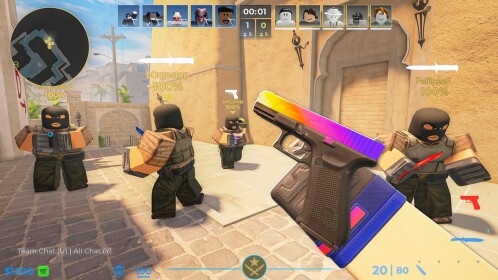
BloxStrike Settings Menu
Use a clean layout and actual in-game settings screenshots where possible.
Next Read
BloxStrike Weapons Guide
Learn rifle, SMG, pistol, and sniper buy logic by round type.
Explore More BloxStrike Guides
Best BloxStrike Settings FAQ
What are the best video settings for BloxStrike?
Turn off Global Shadows, Glass Shatter, Muzzle Flash, and Ragdolls, and keep First Person Tracers on for a cleaner competitive view.
Should I use a static crosshair in BloxStrike?
Yes. A static crosshair is easier to trust and usually better for consistency.
What radar settings help the most?
Use a rotating radar, readable HUD size, and visible Ping/FPS so you can process information faster.
Do settings make you better at BloxStrike?
They help with clarity and consistency, but fundamentals still matter more than any config.